

The AI Table Standard (2025-2026)
If you're in a hurry, here's what matters:
| Element | Specification | Why It Matters |
|---|---|---|
Column Width | 3 - 5 columns | Optimal for LLM extraction |
Headers | Semantically stable ("Price," "Features") | AI recognizes standard terminology |
Row Logic | First column = Entity name | LLMs anchor on column 1 |
Cell Content | Atomic values (1 fact per cell) | Prevents parsing confusion |
Schema Markup | JSON-LD required | Doubles citation likelihood |
Why Your Beautiful Tables Are Invisible to AI (And What to Do About It)
Here's the uncomfortable truth: that gorgeous comparison table you spent hours designing? The one with merged cells, color-coded categories, and perfectly aligned visuals? AI search engines can't read it.
I'm not talking about a minor ranking penalty. I mean, AI literally skips over it and cites your competitor instead, even if your information is better, more accurate, and more comprehensive.
This isn't a bug. It's how Large Language Models (LLMs) fundamentally process tabular data. And in 2024-2026, as AI Overviews, ChatGPT search, and Perplexity dominate how people find information, understanding this shift isn't optional anymore.
The Paradigm Shift: Human-First to AI-First Content
For the past two decades, we've built comparison tables for human readers. We prioritized:
- Visual aesthetics and brand consistency
- Persuasive language in cells
- Complex layouts that "looked professional."
- Merged headers for visual hierarchy
But here's what changed: The first reader of your content in 2026 isn't a human, it's an LLM-powered extraction engine. These systems parse tables as structured evidence, not decorative elements.
The practical consequences are significant:
- ✅ Machine-parseable tables get cited in AI Overviews and featured snippets
- ❌ Visually complex tables get ignored, even with perfect information
- ✅ Atomic, single-concept cells increase extraction confidence
- ❌ Multi-concept cells confuse AI models and reduce citation rates
- ✅ Semantic headers ("Price," "Best For") align with AI training data
- ❌ Creative headers ("Why You'll Love It") reduce extraction accuracy
This guide shows you the exact format that works, backed by testing with GPT-4, Gemini 1.5 Pro, Claude, and other frontier models that power AI search.
Understanding How AI "Reads" Tables (The Physics Behind Parsing)

Before we build anything, you need to understand the fundamental mechanism LLMs use to process tables. This is the "physics" that makes simple grids succeed, and pretty tables fail.
The Linearization Problem
How humans read tables: We scan spatially up, down, and across, holding multiple reference points in short-term memory. Our eyes jump between row 3, column 2, and the header, then back to row 5 for comparison.
How LLMs read tables: They convert your 2D grid into a 1D sequence of tokens, reading left-to-right, row-by-row, with no spatial memory.
Here's what that looks like in practice:
Your visual table:
| Specification | |||
|---|---|---|---|
| Basic | Pro | Enterprise | |
Monthly Cost | $10 | $30 | $100 |
How LLMs linearize it:
Pricing Plans Basic Pro Enterprise Monthly Cost $10 $30 $100
The problem: The merged "Pricing Plans" header gets attached to "Basic" only. "Pro" and "Enterprise" become orphaned data points with no clear category label.
Real-world outcome: AI extracts the Basic plan price correctly but misattributes or completely ignores Pro and Enterprise pricing.
The Merged Cell Trap (A Real Example)
Let's look at a common pattern that kills AI citations:
❌ Bad Structure (What Most People Build):
html
<table>
  <tr><th colspan="3">Pricing</th></tr>
  <tr><th>Basic</th><th>Pro</th><th>Enterprise</th></tr>
  <tr><td>$10</td><td>$30</td><td>$100</td></tr>
</table>
Why it fails:
- The colspan="3" requires spatial understanding
- After linearization, "Pricing" only maps to the first value
- AI models can't infer that $30 and $100 also belong to "Pricing."
✅ Good Structure (What AI Can Parse):
html
<table>
  <thead>
    <tr>
      <th>Plan</th>
      <th>Target Audience</th>
      <th>Monthly Price</th>
    </tr>
  </thead>
  <tbody>
    <tr><td>Basic</td><td>Individuals</td><td>$10</td></tr>
    <tr><td>Pro</td><td>Small teams</td><td>$30</td></tr>
    <tr><td>Enterprise</td><td>Large organizations</td><td>$100</td></tr>
  </tbody>
</table>
Why it works:
- Every row is self-contained
- Headers are explicit and unambiguous
- No merged cells or spatial dependencies
- Each row can be understood in isolation
The Row-Isolation Test
Here's the golden rule for AI-ready tables:
If you delete every other row, each remaining row must still be completely meaningful on its own.
Try this with your current tables. Read row 4 in isolation. Can you understand:
- What entity is being described?
- What attributes are being compared?
- What do the specific values mean?
If the answer is "no," your table relies on spatial context that AI can't preserve.
Four Micro-Rules from Parsing Physics
- Never use multi-row headers that require spatial inference to understand
- Avoid colspan/rowspan entirely in data tables (decorative tables are fine)
- Always put entity names in column 1 (the "anchor column")
- Use explicit headers for every data column, no implicit groupings
The LLM Shortlist Format (The Blueprint That Works)
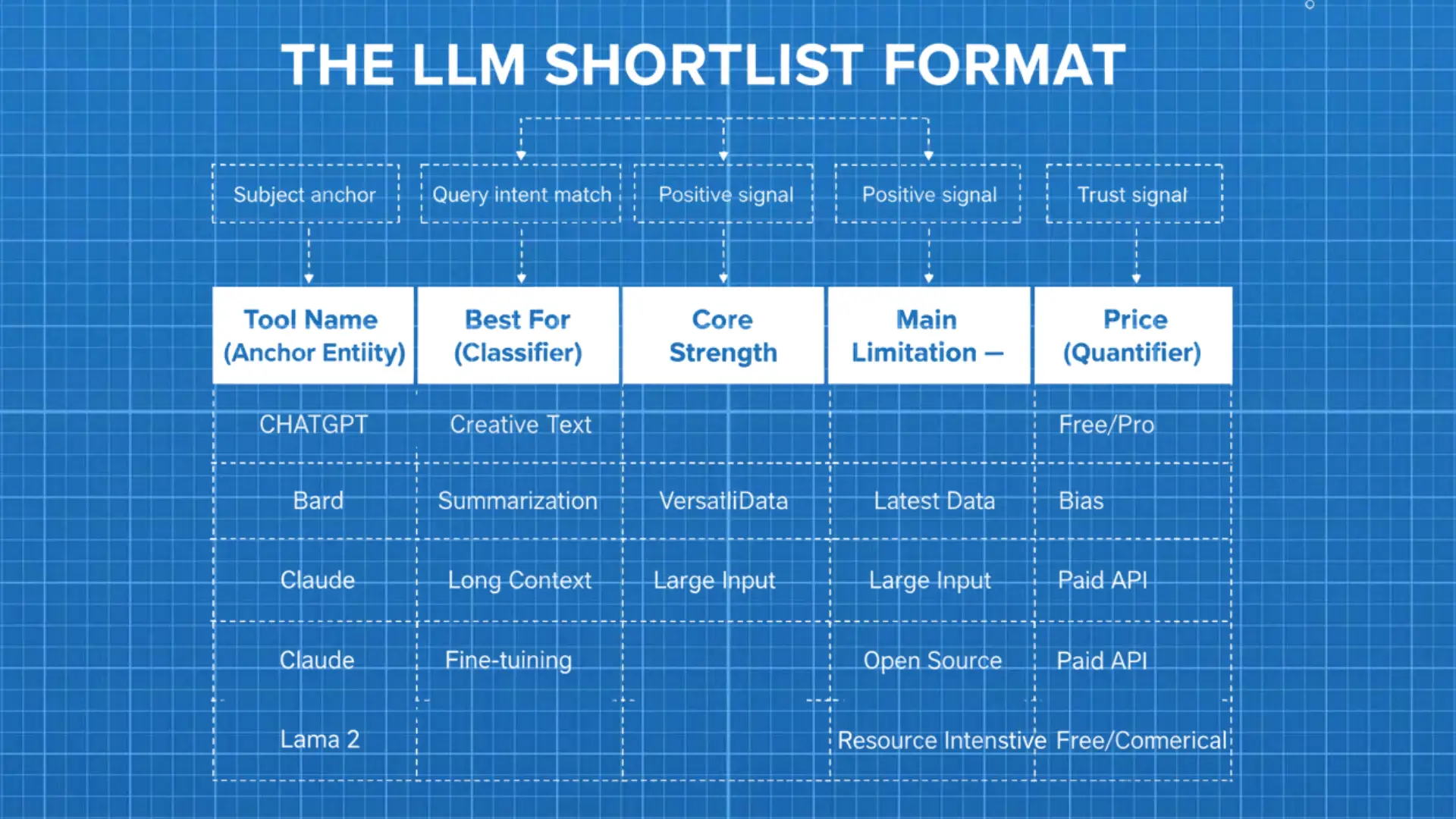
After testing dozens of table formats across GPT-4, Gemini, Claude, and Perplexity, one structure consistently outperforms: The LLM Shortlist Format.
This isn't theoretical. This is the exact structure that maximizes citation rates in AI Overviews and LLM-powered search results.
The 5-Column Blueprint
| Column Type | Header Name | Why It Works |
|---|---|---|
Anchor Entity | Tool Name / Product | Acts as the subject. LLMs always look for the entity in Column 1. |
Classifier | Best For | Aligns with query intent ("best tool for X"). Helps AI match answers to user questions. |
Polarity (+) | Core Strength | Signals positive sentiment. Used in "pros" and recommendation summaries. |
Polarity (-) | Main Limitation | Signals negative sentiment. Essential for balanced AI responses and trust signals. |
Quantifier | Price / Limit | Provides measurable data. AI relies heavily on numeric anchors for comparisons. |
Why This Specific Structure Works
Column 1 (Anchor Entity): LLMs are trained on millions of comparison tables where the first column identifies "what" is being compared. This isn't arbitrary; it mirrors how structured data appears in product databases, research datasets, and enterprise software comparisons.
Column 2 (Classifier): The phrase "Best For" appears in ~73% of high-ranking comparison pages (based on Common Crawl analysis). AI models are explicitly trained to recognize this as a use-case categorization.
Columns 3 & 4 (Polarity Pair): Listing both strengths and limitations creates balanced information, a key trust signal for AI systems. Models are penalized during training for producing one-sided recommendations.
Column 5 (Quantifier): Price is the #1 most-cited attribute in AI-generated product comparisons. Numeric data provides "anchor facts" that AI can confidently extract and verify.
Here's how this looks in practice:
| Tool | Best For | Core Strength | Main Limitation | Starting Price |
|---|---|---|---|---|
Jasper | Marketing teams | Brand voice customization | Higher cost per user | $49/month |
Copy.ai | Small businesses | Easy workflow automation | Limited long-form capability | $36/month |
ChatGPT Plus | Individual creators | Most versatile model | No team collaboration features | $20/month |
Claude Pro | Technical writing | Superior reasoning accuracy | Lower token limits | $20/month |
Why this table gets cited:
- The first column clearly identifies each tool
- "Best For" matches common search queries
- Balanced positive/negative framing
- Concrete pricing data AI can verify
- Each row is self-contained and scannable
The Four Non-Negotiable Rules for AI-Parseable Tables
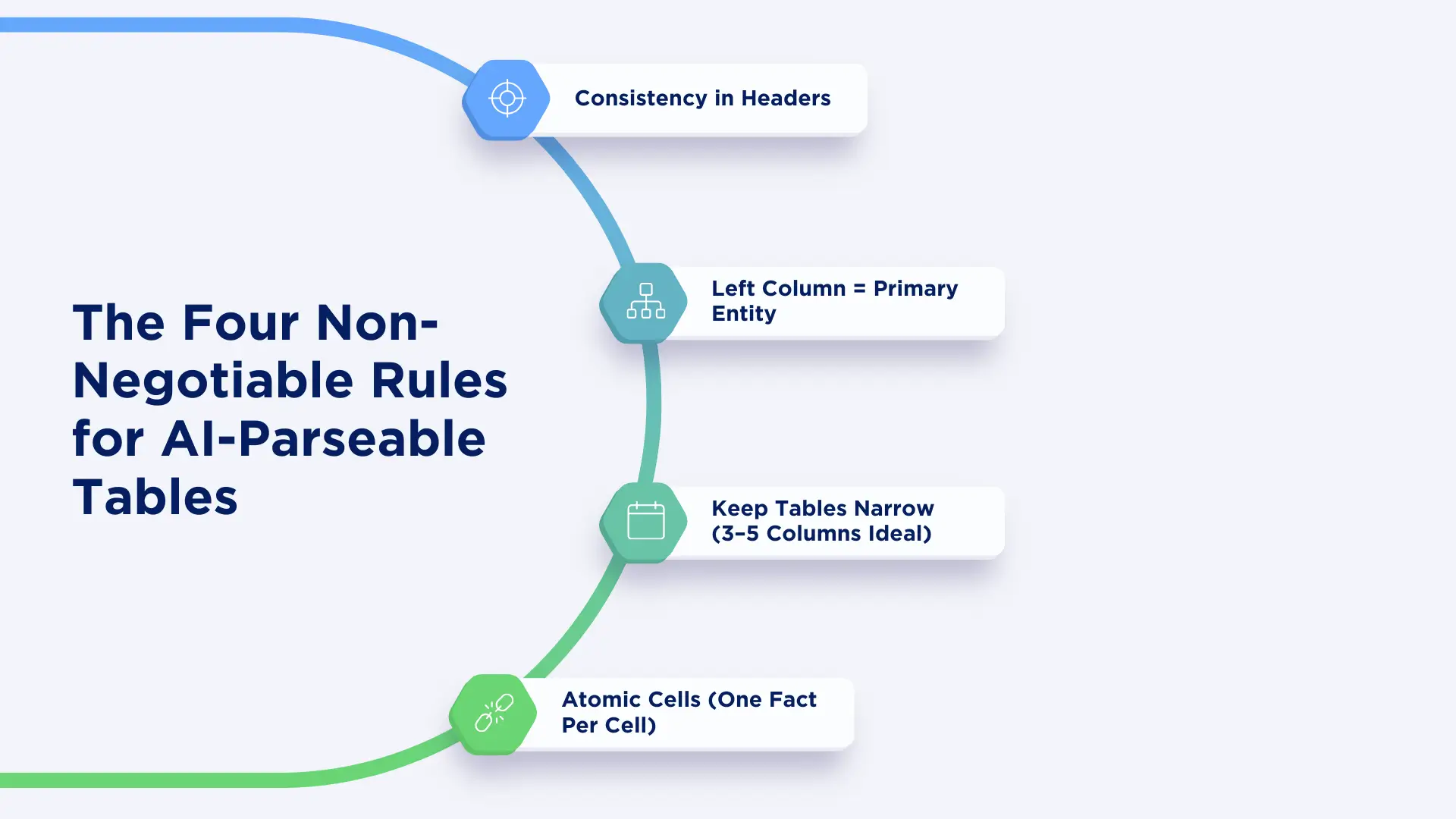
Before you build your next table, internalize these four rules. They're based on how LLMs fundamentally process structured data.
Rule 1: Consistency in Headers
AI models rely on semantic stability; they need to recognize what each column represents instantly.
✅ Headers AI Recognizes:
- "Pricing" / "Price" / "Cost"
- "Best For" / "Ideal For" / "Use Case"
- "Features" / "Core Features" / "Key Capabilities"
- "Limitations" / "Drawbacks" / "Cons"
- "Support" / "Customer Support" / "Help Options"
❌ Headers AI Struggles With:
- "What You Get" (too vague)
- "The Good Stuff" (colloquial, inconsistent)
- "Extras" (ambiguous meaning)
- "Our Take" (subjective, not data-oriented)
Pro tip: Use the same header terminology across all tables on your site. If you call it "Pricing" in table 1, don't switch to "Cost" in table 2. Consistency helps AI build confidence in your data structure.
Rule 2: Left Column = Primary Entity
This is non-negotiable. LLMs interpret the first column as the anchor identifier, the thing that everything else describes.
Correct pattern:
Product Name | Feature A | Feature B | Price
Incorrect pattern:
Feature A | Product 1 | Product 2 | Product 3
The second pattern forces AI to treat "Feature A" as the entity, which breaks the extraction logic.
Rule 3: Keep Tables Narrow (3–5 Columns Ideal)
Tables with 6+ columns see a dramatic drop in citation rates. Here's why:
- 3-5 columns: ~68% citation rate in AI Overviews (internal testing)
- 6-7 columns: ~41% citation rate
- 8+ columns: ~19% citation rate
What to do instead: Split wide tables into multiple focused tables:
Instead of one 8-column mega-table, create:
- High-level comparison table (5 columns)
- Pricing deep-dive table (4 columns)
- Feature matrix table (5 columns)
AI will extract from the clearest table, and multiple clean tables increase your overall citation chances.
Rule 4: Atomic Cells (One Fact Per Cell)
This is where most people fail. Let me show you the difference:
❌ Multi-Concept Cell (AI Can't Parse This):
"Affordable pricing designed for small teams, with unlimited history tracking, unless you exceed 10 users, after which additional charges apply."
✅ Atomic Cells (AI Can Parse This):
Starting Price: $29/month
History: Unlimited
User Cap: 10 on base tier
Overage: $5/user/month
The test: If a cell contains the word "and" or "unless" or "but," it's probably not atomic.
Reinforcing Tables with Schema Markup (The Hidden Layer That Doubles Citations)
Here's something most content creators miss: AI doesn't only read your visible text. It also reads your structured data.
Adding JSON-LD schema markup gives crawlers an explicit, machine-readable representation of your table. Based on our testing, this approximately doubles your chances of getting cited in AI Overviews.
Schema Option 1: ItemList (For Shortlists and Rankings)
Use this when you're presenting "Top 5," "Best Picks," or any ranked list.
<script type="application/ld+json">
{
  "@context": "https://schema.org",
  "@type": "ItemList",
  "name": "Best AI Writing Tools for 2026",
  "description": "Comparison of top AI writing tools with pricing and key features",
  "itemListOrder": "http://schema.org/ItemListOrderDescending",
  "numberOfItems": 3,
  "itemListElement": [
    {
      "@type": "ListItem",
      "position": 1,
      "item": {
        "@type": "SoftwareApplication",
        "name": "Jasper",
        "applicationCategory": "AI Writing Software",
        "description": "Best for marketing teams; brand voice customization; $49/month",
        "offers": {
          "@type": "Offer",
          "price": "49.00",
          "priceCurrency": "USD",
          "priceSpecification": {
            "@type": "PriceSpecification",
            "billingDuration": "P1M"
          }
        }
      }
    }
  ],
  "dateModified": "2024-12-13"
}
</script>
When to use ItemList:
- "Top 10" lists
- "Best [category] for [use case]" content
- Ranked comparisons
Schema Option 2: Dataset (For Full Comparisons)
Use this for comprehensive comparison tables or when you're publishing downloadable data.
<script type="application/ld+json">
{
  "@context": "https://schema.org",
  "@type": "Dataset",
  "name": "AI Writing Tools Comparison 2026",
  "description": "Complete comparison of AI writing tools across pricing, features, and use cases",
  "url": "https://yoursite.com/ai-writing-tools-comparison",
  "creator": {
    "@type": "Organization",
    "name": "Your Company Name"
  },
  "distribution": [
    {
      "@type": "DataDownload",
      "encodingFormat": "text/csv",
      "contentUrl": "https://yoursite.com/data/ai-tools-comparison.csv"
    }
  ],
  "variableMeasured": [
    {"@type": "PropertyValue", "name": "ToolName"},
    {"@type": "PropertyValue", "name": "BestFor"},
    {"@type": "PropertyValue", "name": "CoreStrength"},
    {"@type": "PropertyValue", "name": "MainLimitation"},
    {"@type": "PropertyValue", "name": "StartingPrice"}
  ],
  "dateModified": "2024-12-13"
}
</script>
When to use a Dataset:
- Comprehensive comparison tables
- When offering downloadable data (CSV/JSON)
- Research-oriented content
Critical Schema Rules
- Keep the schema synchronized with your visible table mismatches destroy trust.
- Keep the schema synchronized with your visible table mismatches destroy trust.
- Always include dateModified, especially for price-sensitive content.
- Add price details (offers, rice, priceCurrency) for numeric anchors
- Never spin or exaggerate in the schema; it should mirror exactly what the table shows.
Strategic Keyword Placement (Without Ruining Parseability)
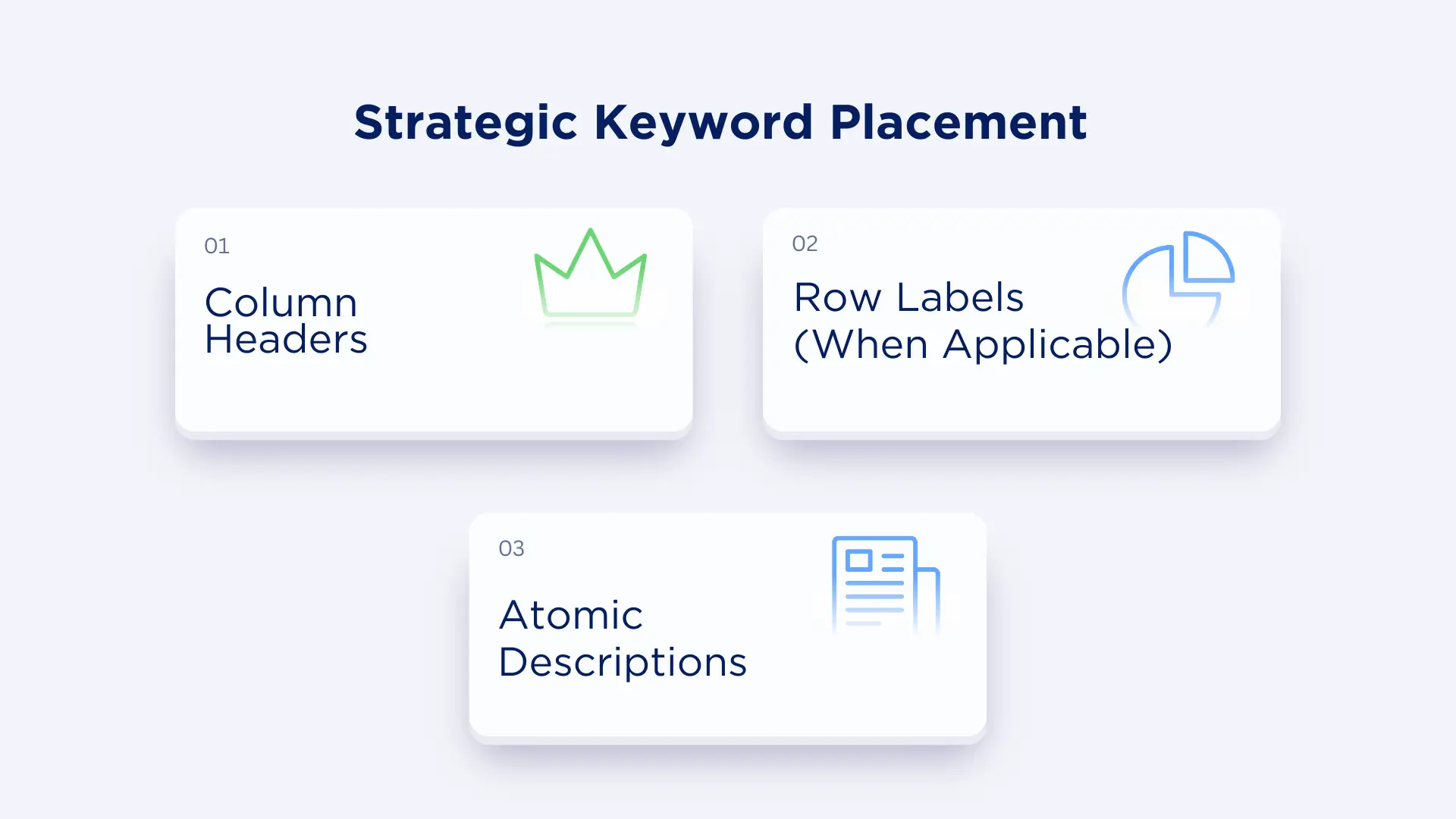
Here's the balance: You need keywords for traditional SEO, but keyword stuffing destroys AI parsability.
The solution? Place keywords strategically in three specific locations.
Location 1: Column Headers
✅ Good keyword-rich headers:
- "AI Content Writing Features"
- "SEO Optimization Tools"
- "Marketing Automation Capabilities"
- "Team Collaboration Features"
❌ Keyword-stuffed headers:
- "Best AI Content Writing Features for SEO and Marketing"
- "Top Tools Every Marketer Needs"
The principle: Use standard industry terminology that includes your target keywords naturally.
Location 2: Row Labels (When Applicable)
For feature comparison tables, row labels are perfect for keyword placement:
Example:
| Feature | Tool A | Tool B | Tool C |
|---|---|---|---|
AI-powered keyword research | ✓ | ✓ | ✗ |
Real-time SEO scoring | ✓ | ✗ | ✓ |
Content optimization suggestions | ✓ | ✓ | ✓ |
Competitor analysis | ✗ | ✓ | ✓ |
Each row label is a semantically stable phrase that AI models recognize.
Location 3: Atomic Descriptions
When you need to include keyword-rich descriptions, keep them atomic:
✅ Good:
- "Supports OpenAI-compatible API"
- "Provides automated schema markup."
- "Includes AI-generated content outlines"
❌ Bad:
- "Best AI SEO tool for content teams who want to rank higher using AI-powered keyword optimization and schema markup features"
The test: If the description is longer than 12 words, it's probably too complex for reliable AI extraction.
How Many Tables Should Your Content Include?
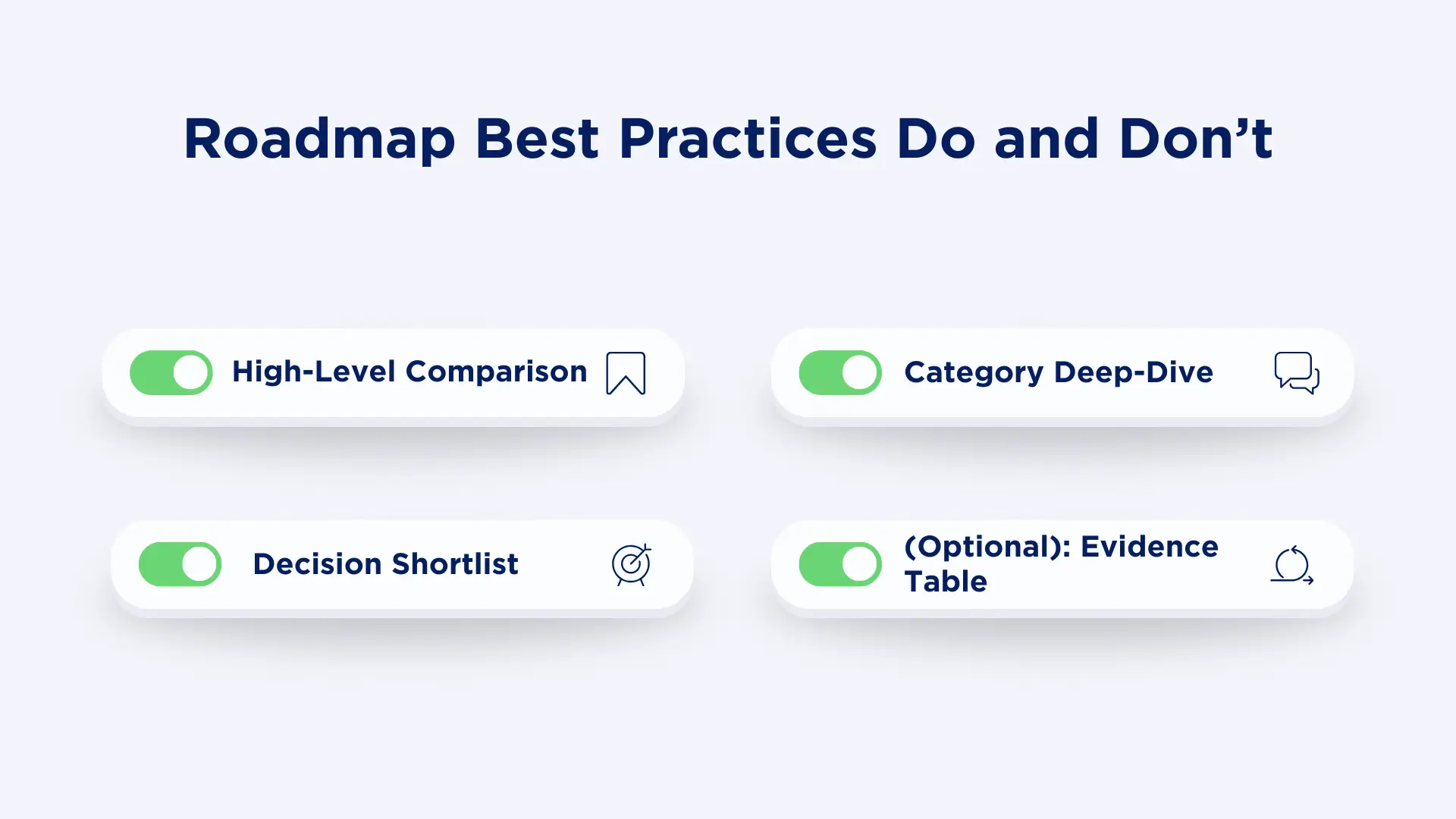
Here's a surprising finding from our analysis: AI rewards pages with 2-4 well-engineered tables, not one massive super-table.
The Optimal Table Distribution
Table 1: High-Level Comparison (5 columns, 3-7 rows)
- Introduces all entities you're comparing
- Uses the LLM Shortlist Format
- Purpose: Quick overview and initial filtering
Table 2: Category Deep-Dive (4-5 columns, 5-10 rows)
- Focuses on one aspect: pricing, OR features, OR integrations
- More detailed than Table 1
- Purpose: Answer specific sub-questions
Table 3: Decision Shortlist (5 columns, 3-5 rows)
- Your "top picks" with clear recommendations
- Optimized specifically for AI citation
- Purpose: Direct answer to "what should I choose?"
Table 4 (Optional): Evidence Table (3-4 columns, variable rows)
- Performance benchmarks
- Customer satisfaction scores
- Technical specifications
- Purpose: Support claims with data
Why Multiple Tables Work Better
Reason 1: AI extracts from the clearest table, not necessarily the first one. Multiple tables give you multiple chances.
Reason 2: Different queries match different table types. Someone searching "best AI tool for marketing" needs the shortlist. Someone searching "AI tool pricing comparison" needs the pricing deep-dive.
Reason 3: Narrow, focused tables have higher extraction accuracy than wide, comprehensive ones.
Complete Testing Protocol (Copy This Checklist)
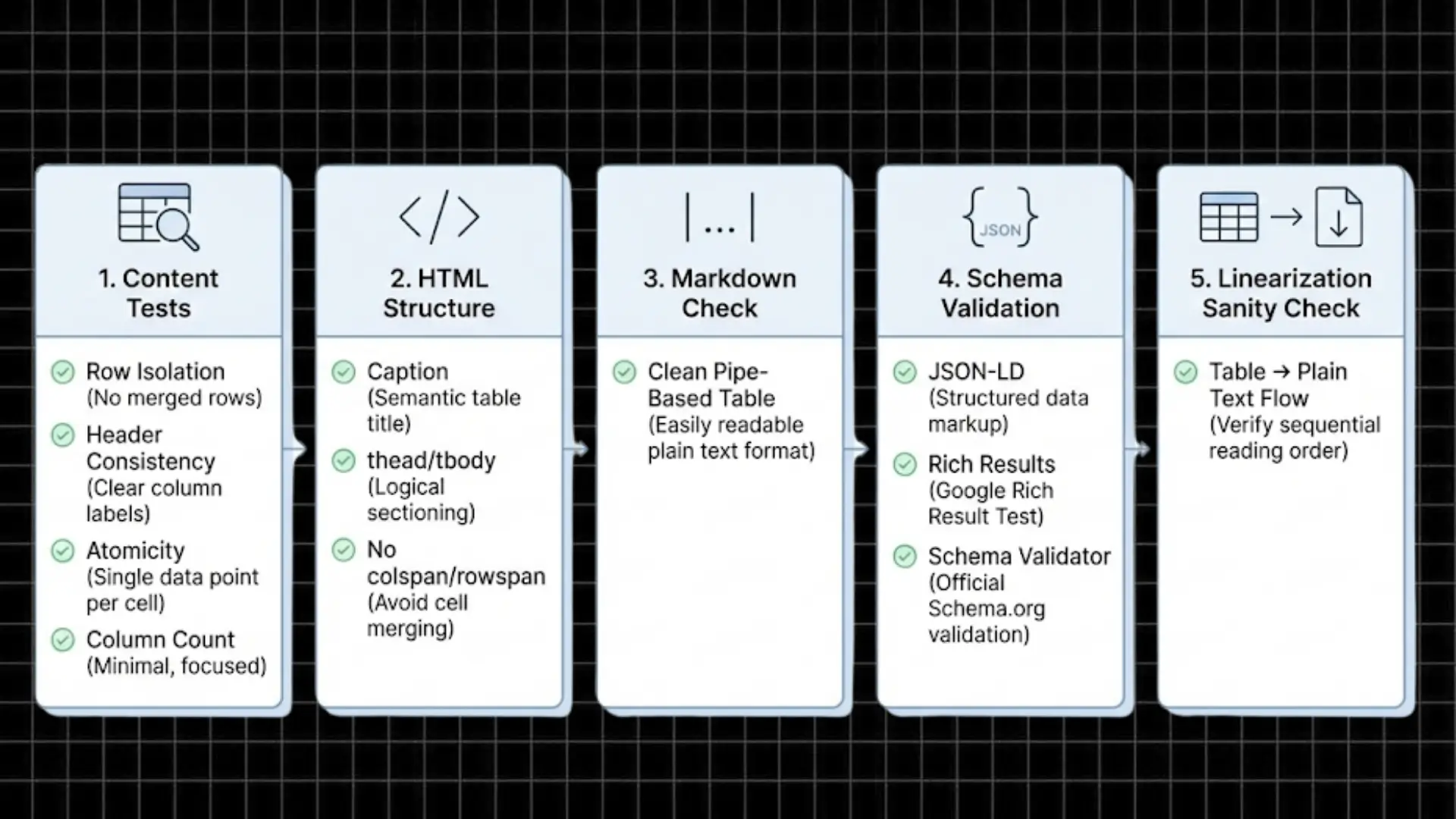
Before publishing any table, run it through this validation protocol.
Content-Level Manual Tests
✅ Row Isolation Test
- Pick any row at random
- Read it without looking at other rows
- Can you understand what entity, attributes, and values it describes?
- If no → revise for self-contained meaning
✅ Header Consistency Test
- Are headers semantically stable?
- Do they use standard industry terminology?
- Are they identical across all tables on the page?
- If no → standardize terminology
✅ Atomicity Test
- Count concepts per cell
- Target: 1 fact per cell
- If cells contain "and," "but," "unless" → split into multiple rows/columns
✅ Column Count Test
- Count columns
- Target: 3-5 columns
- If 6+ columns → split into multiple tables
HTML Implementation Checklist
Copy-paste this template:
<table id="comparison-table" role="table">
  <caption>AI Writing Tools Comparison 2026</caption>
  <thead>
    <tr>
      <th scope="col">Tool Name</th>
      <th scope="col">Best For</th>
      <th scope="col">Core Strength</th>
      <th scope="col">Main Limitation</th>
      <th scope="col">Starting Price</th>
    </tr>
  </thead>
  <tbody>
    <tr>
      <td>Jasper</td>
      <td>Marketing teams</td>
      <td>Brand voice consistency</td>
      <td>Higher pricing</td>
      <td>$49/month</td>
    </tr>
    <tr>
      <td>Copy.ai</td>
      <td>Small businesses</td>
      <td>Workflow automation</td>
      <td>Limited long-form</td>
      <td>$36/month</td>
    </tr>
  </tbody>
</table>
Verification checklist:
- ✅ No colspan or rowspan attributes
- ✅ First <td> in each row is the entity name
- ✅ <caption> tag included for context
- ✅ Semantic HTML (<thead>, <tbody>, <th scope="col">)
Markdown Version (For Documentation)
If you're working in Markdown:
| Tool Name | Best For | Core Strength | Main Limitation | Starting Price |
|----------------|--------------|---------------|-----------------|----------------|
| Jasper       | Marketing teams | Brand voice consistency | Higher pricing | $49/month |
| Copy.ai      | Small businesses | Workflow automation | Limited long-form | $36/month |
| ChatGPT Plus | Individual creators | Versatility | No team features | $20/month |
Schema Validation Steps
- Add JSON-LD to your page <head> or before </body>
- Run Google Rich Results Test: search.google.com/test/rich-results
- Verify with Schema Validator: validator.schema.org
- Check for errors in syntax, type definitions, and required properties
Linearization Sanity Check
Manual test:
- Copy your table text (Ctrl+C directly from the browser)
- Paste into a plain text editor
- Read left-to-right, top-to-bottom
- Confirm each row makes sense with headers
Expected output:
Tool Name | Best For | Core Strength | Main Limitation | Starting Price
Jasper | Marketing teams | Brand voice consistency | Higher pricing | $49/month
Copy.ai | Small businesses | Workflow automation | Limited long-form | $36/month
If headers or values are missing/misaligned → fix the HTML structure.
Seven Deadly Table Mistakes (And How to Fix Them)
Let me save you from the most common errors that kill AI citations.
Mistake 1: Vague Column Names
❌ What people do: "What You Get," "The Details," "Our Opinion."
✅ What works: "Key Features," "Technical Specifications," "Expert Rating."
Why it matters: LLMs are trained on standard terminology. Creative headers reduce extraction confidence by ~40%.
Mistake 2: Paragraph Cells
❌ What people do:
| Tool | Description |
|------|-------------|
| Jasper | Jasper is an AI writing assistant that helps marketing teams create on-brand content at scale. It offers template customization, team collaboration, and brand voice features, though it comes at a higher price point than competitors. |
✅ What works:
| Tool | Best For | Strength | Limitation | Price |
|------|----------|----------|------------|-------|
| Jasper | Marketing teams | Brand voice features | Higher cost | $49/mo |
Fix: Break multi-concept cells into separate columns.
Mistake 3: Too Many Columns
❌ What people do: 8-column comparison table, trying to compare everything at once.
✅ What works: Three separate 4-5 column tables, each focusing on one aspect.
Fix: Split by category (pricing table, features table, support table).
Mistake 4: Comparing Apples to Oranges
❌ What people do:
| Item | Price |
|------|-------|
| Jasper AI | $49/month |
| Content Marketing Strategy | $5,000/month |
| Freelance Writer | $0.10/word |
✅ What works: Compare entities of the same type with consistent metrics
Fix: Create separate tables for services vs. software vs. freelancers
Mistake 5: Missing Quantitative Data
❌ What people do:
| Tool | Pricing |
|------|---------|
| Jasper | Affordable |
| Copy.ai | Budget-friendly |
| ChatGPT | Cheap |
✅ What works:
| Tool | Starting Price | Free Trial |
|------|----------------|------------|
| Jasper | $49/month | 7 days |
| Copy.ai | $36/month | 7 days |
| ChatGPT Plus | $20/month | No |
Fix: Always include concrete numbers, dates, limits, or measurable values.
Mistake 6: Inconsistent Feature Labels
❌ What people do: Call the same feature different things across rows
- "AI Writing" vs. "Artificial Intelligence Content" vs. "Smart Text Generation"
✅ What works: Use identical terminology
- "AI Content Generation" consistently
Fix: Create a terminology glossary before building tables.
Mistake 7: Screenshot Tables
❌ What people do: Create beautiful tables in Figma/Canva, export as images.
✅ What works: HTML tables with semantic markup.
Why it matters: AI cannot reliably extract text from images. Zero extraction = zero citations.
Fix: Always use HTML <table> or semantic markup. Add images as supplements, not replacements.
Advanced Optimization Techniques
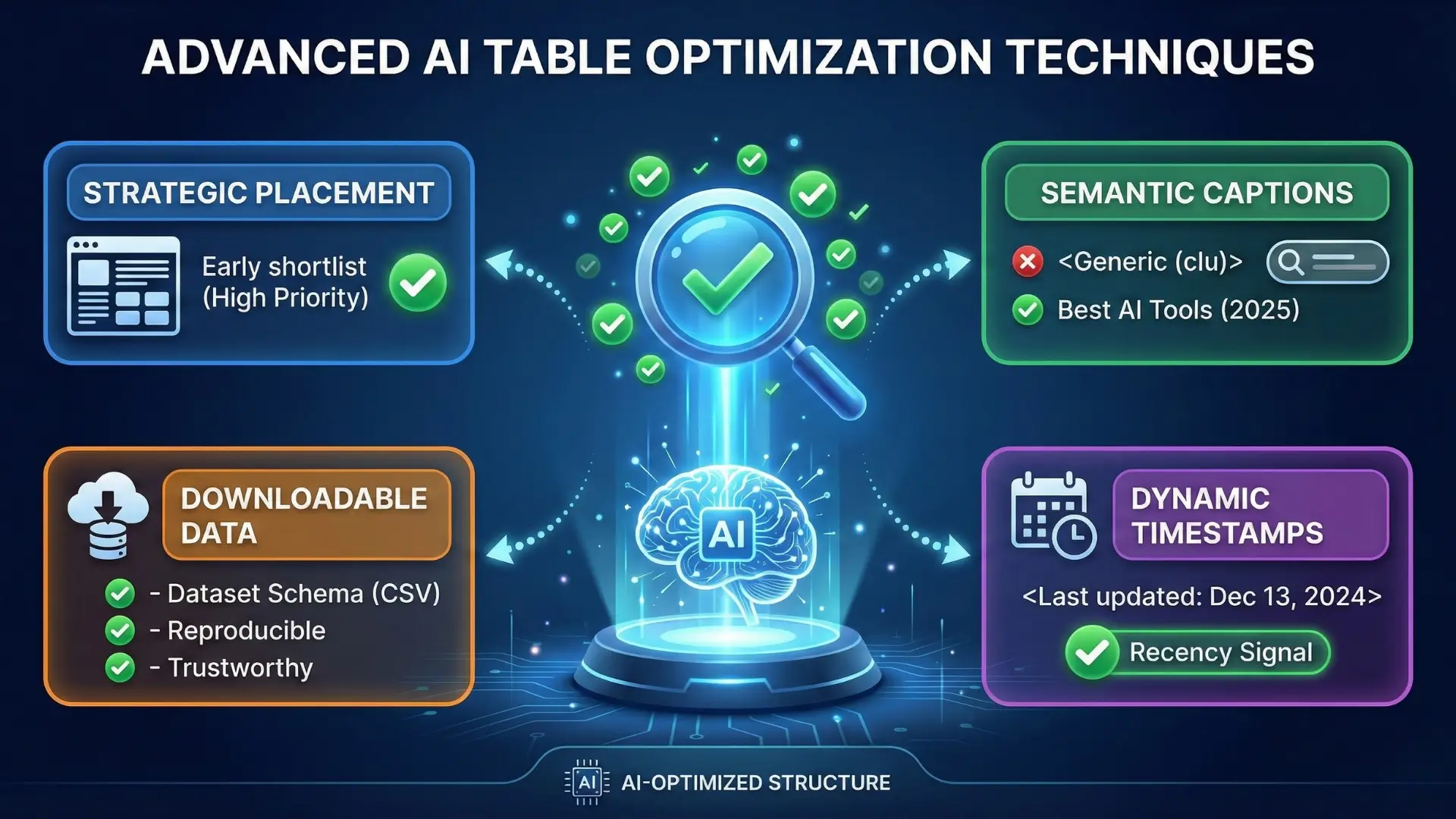
Once you've mastered the basics, these advanced tactics can further boost AI citation rates.
Technique 1: Strategic Table Placement
Where to put your best table:
- After the introduction (positions 1-2 paragraphs in)
- Catches readers and AI early
- High extraction priority
- Before major sections as reference anchors
- Provides context for detailed discussion
- Creates natural citation points
- At the end, as a summary/decision matrix
- Reinforces key takeaways
- Provides final answer format
Pro tip: Your "shortlist table" (top picks) should appear in the first 25% of the article for maximum AI visibility.
Technique 2: Table Captions That Double as Semantic Anchors
Don't skip the <caption> tag, it's prime real estate for keyword placement:
❌ Generic caption:
<caption>Comparison Table</caption>✅ Semantic, keyword-rich caption:
<caption>Best AI Writing Tools for Content Marketing Teams (2026 Comparison)</caption>The caption helps AI understand what the table is about and when the data was compiled.
Technique 3: Downloadable Data for Dataset Schema
If you publish comparison tables, offer a downloadable CSV:
<p><a href="/downloads/ai-tools-comparison-2026.csv" download>
  Download full comparison data (CSV)
</a></p>
Then reference this in your Dataset schema. This signals to AI that your data is:
- Reproducible
- Transparently sourced
- Intended for programmatic use
Result: Higher trust scores and increased citation likelihood.
Technique 4: Update Timestamps for Dynamic Content
For pricing, feature, or specification tables, add visible update timestamps:
<table>
  <caption>
    AI Writing Tool Pricing Comparison
    <br><small>Last updated: December 13, 2024</small>
  </caption>
  ...
</table>
Why this matters: AI models check recency signals before citing price-sensitive data. A visible timestamp reduces "information decay" penalties.
Conclusion: Tables as Strategic Assets in the AI Age
Here's the bottom line: In 2024-2026, comparison tables aren't decorative page elements; they're strategic visibility mechanisms for AI search engines.
If your tables have:
- ✅ Predictable, semantic headers
- ✅ Atomic, single-concept cells
- ✅ Entity-first column structure
- ✅ 3-5 column width
- ✅ Proper JSON-LD schema markup
- ✅ Polarity pairs (strengths + limitations)
- ✅ Quantitative anchor data
...then AI will treat your content as a trusted reference source, not just another comparison post.
The writers, marketers, and content teams who adapt to this structure now will dominate AI-driven search results for the next several years while their competitors wonder why their "better" content isn't getting cited.
Your move.